 PluBIM Help
TabColor
Color the open view tabs by document.
- Ribbon group
- Environment
- Version
- PluBIM 1.5.0
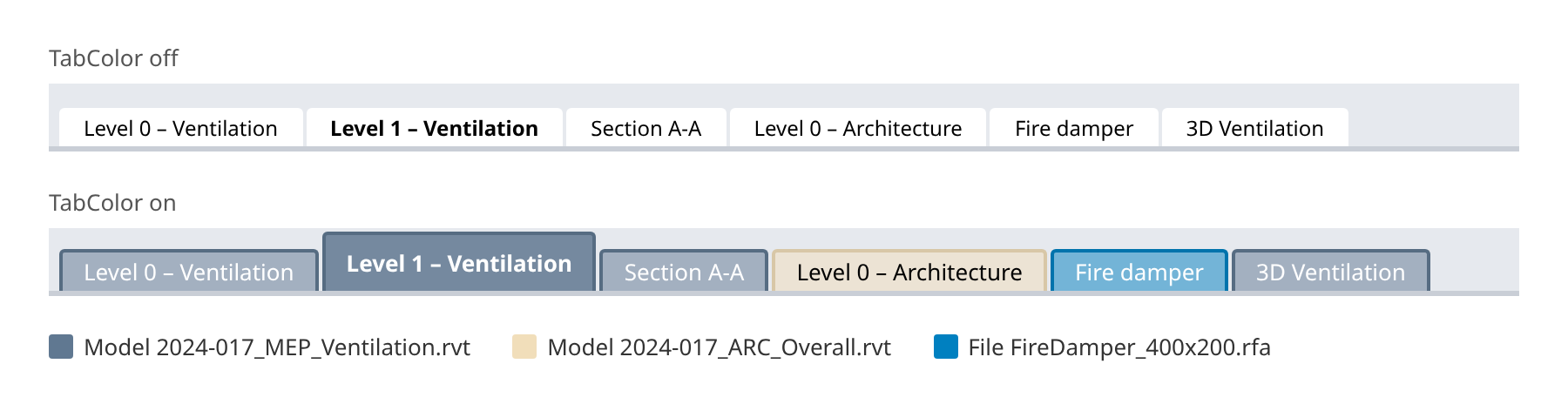
TabColor colors the tabs of the open views by model or file: all views of one model or file have the same color. You can see at a glance which view belongs to which model or file.
When to use it
- Several models or families are open at the same time.
Turn TabColor on and off
In the ribbon, click PluBIM › Environment › TabColor.
The icon shows the new state:
 on: the tabs are colored. Click again to turn TabColor off.
 off: the tabs have the Revit colors again.
Each open model and each open file has its own color. The tab of the active view is strong and bold, the others are paler. Views you open later are colored right away. The setting is kept after Revit restarts.
Limitations
- Colors are assigned per Revit session. After a restart, a model or file can get a different color.